


 Netherlands
 Bestseller
 All Printers
 All Labels
 Money Counters
 All Accessories
As an Etsy seller, shipping is one of the most important aspects of your business. Printing shipping labels correctly is crucial to ensure that your orders arrive on time and undamaged to your customers.
In this blog post, we will explain step-by-step how to print shipping labels for Etsy products. This includes information on the equipment you'll need, as well as the benefits of using Munbyn products for your Etsy shipping requirements.
Required Equipment for Printing Etsy Shipping Labels
For printing shipping labels on Etsy, having the right equipment is essential for an efficient shipping process. Besides a computer, the choice of printer and labels also plays a crucial role in the quality and speed of printing.
With the right tools, you can optimize your shipping operations and enhance the overall customer experience. Below, we'll give you an overview of the necessary equipment.

Computer: You'll need a computer to log into your Etsy account and create the shipping label.
Printer: For printing the shipping label. While it is possible to use a standard printer, it is highly recommended to use a thermal label printer as it offers better quality and faster printing.
Shipping Labels: Necessary for printing the shipping label. Etsy recommends using the standard size of 4" x 6" for shipping labels. This size not only ensures a professional appearance but also simplifies the printing process, as no additional adjustments or changes are required.
Scale: You'll need a scale to weigh your package. For smaller packages, a small digital scale is suitable. However, if you are shipping packages that weigh more than 50 pounds, a more robust scale that can handle this weight is needed.
How to Print Shipping Labels on Etsy
After you have prepared the necessary equipment, follow these steps to print your Etsy shipping labels:
Step 1: Log in to your Etsy account
Once logged in, navigate to the Shop Manager and select "Orders & Shipping" from the drop-down menu.
Then, locate the order for which you want to print a shipping label and click the truck icon to purchase the label.

Step 2: Check the Shipping Details
The next step is to review or enter the shipping details to get an accurate label quote from Etsy. Etsy automatically calculates shipping costs based on weight and the selected shipping method. The required information includes:
- Package Weight: The total weight of the package.
- Packaging Type: Whether it's an envelope or a box, depending on how the order is packaged.
- Length, Width, Height: The physical dimensions of your package. Provide the length, width, and height.
- Delivery Service: This determines the delivery speed to the buyer and affects the shipping price.
After entering your package data, you have the option to save it and create a new shipping profile. This profile can be used for future listings with the same shipping requirements, saving you time and effort.
Also, check that your own address and the buyer's address are correct.
Step 3: Purchase the Shipping Label
After carefully reviewing the shipping data, you can purchase the shipping label.
1. First, click the "Review" button.
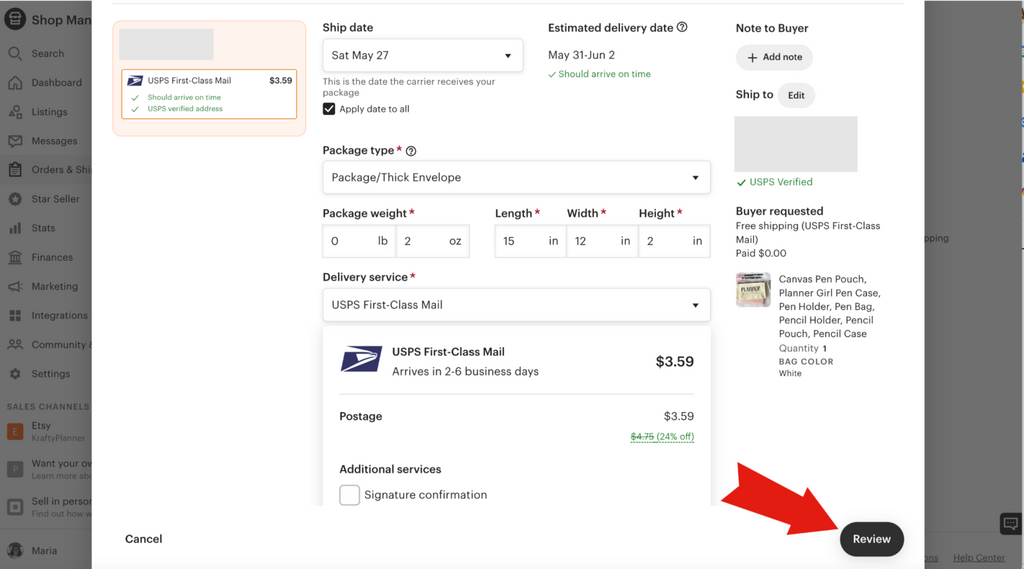 2. Then, take a moment to check the information on the following screen and click "Purchase."
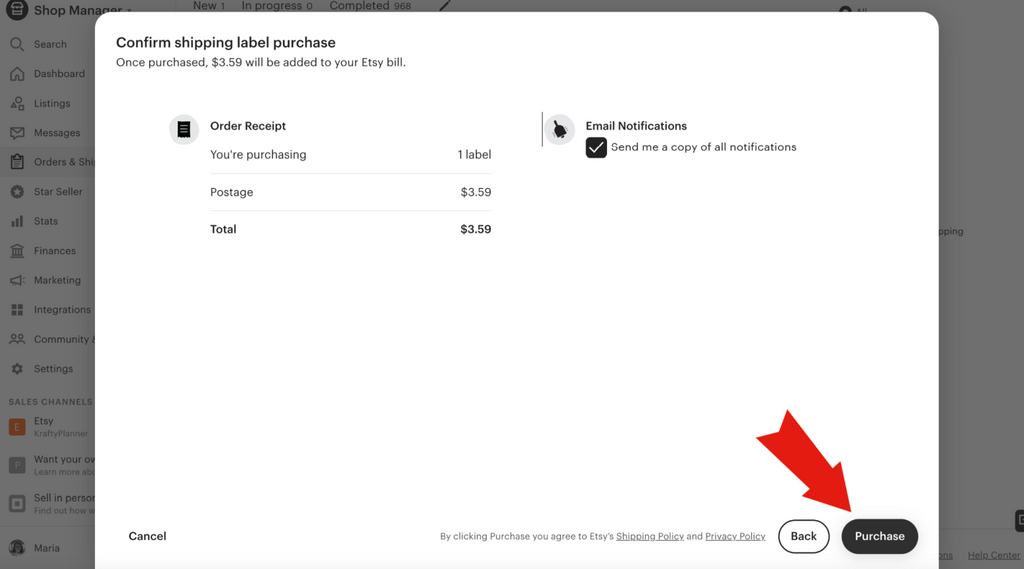
After you have purchased the label, Etsy will send a shipping notification to your buyer to inform them that their order is being processed.
Step 4: Print the Shipping Label
Finally, you need to print the shipping label. After you click the "Purchase" button, a new pop-up window will appear prompting you to print the shipping label and packing slips.

First, click the "Print Shipping Labels" button. A new window will open displaying a PDF file of your shipping label for printing.

I strongly recommend using a thermal label printer for better print quality and faster speed. However, if you don't have such a printer available, you can also use a conventional printer to print the labels. Please note that with an inkjet printer, there is a risk of the ink running if the label gets wet during transit.
Carefully check the label before attaching it to your package to ensure all information is correct.
Then click "Print Packing Slips". Another window will open with a PDF file containing the packing slips and order forms for printing:
- Packing slips are for your buyers. They offer the option to add a personal message, a coupon code, and more. Orders declared as gifts will be printed without price information and will include a gift message from the buyer.
- Order confirmations are for your organization. They help you process and document orders.
After you have printed all necessary documents and labels, you can prepare your package for shipment and send it to your customer.

Benefits of Using Munbyn Products for Etsy Shipmentsd
Munbyn is a leading provider of thermal label printers, labels, and other shipping supplies. The company offers high-quality products that are durable and guaranteed for quality. Here are some benefits of using Munbyn products for your shipping needs.
High-Quality Printing: Munbyn thermal printers produce high-quality prints with a resolution of 203 or 300 dpi, ensuring that your shipping labels are clear and easy to read.
Faster Printing Speed: Munbyn thermal label printers can print up to 72 labels per minute at a speed of 150 mm/s, making them some of the fastest printers on the market. This allows you to quickly and efficiently print your shipping labels.
Easy to Use: Munbyn thermal label printers are easy to set up and even easier to operate. They come with user-friendly software that simplifies the creation and printing of shipping labels.
Versatile: Munbyn thermal label printers can print a variety of label sizes and materials, giving you more flexibility in your shipping operations.
Cost-Effective: Munbyn thermal label printers are affordable, making them an excellent option for small businesses and Etsy sellers who want to save on their shipping equipment costs.
In summary, printing Etsy shipping labels might seem daunting at first, but it doesn't have to be. Using a thermal label printer like those from Munbyn can speed up the process, make it more efficient, and more cost-effective.
I hope this ultimate guide to printing Etsy shipping labels helps you optimize your shipping processes.
Happy shipping!

Share:
How to print a perfect shipping label?
How to Make Your Own Temporary Tattoos with a Thermal Printer