



 France
 Bestseller
 All Printers
 All Labels
 Money Counters
 All Accessories
The e-commerce landscape is evolving rapidly in 2026, marked by strong growth in "micro-entrepreneurs" and home boutiques. Current logistics reports show that small businesses today prioritize "seamless fulfillment processes" more than almost any other operational metric. As shipping providers increasingly impose stricter requirements for scannable barcodes, the need for high-quality shipping label printing has transformed from a luxury to a fundamental necessity. For many new entrepreneurs, the first challenge is not just making a sale, but professionally shipping the order.
Choosing the best printer for your e-commerce business therefore means finding a device that can keep pace with your growth, works reliably even during late-night packing sessions, and ensures that your investment in a thermal shipping label printer pays off through time savings and reduced material consumption.
In this guide, you will learn:
- The fundamental differences between inkjet and thermal printing technology in logistics
- Important technical specifications like DPI and DAC technology that influence barcode readability
- How to match your shipping volume to the appropriate printer model
- The advantages of specialized features such as two-color printing and automatic label recognition
- A comparison of professional printers for small business growth
The Evolution of Shipping Label Printing in Modern Logistics
Modern shipping processes require far more than just a name and address. High-contrast, durable labels are needed to withstand the demands of global transport routes.
Whether you ship ten packages a week or two hundred a day – the efficiency of your fulfillment begins with the right hardware. Using a conventional office printer often leads to paper waste, high ink costs, and additional effort in attaching labels. Therefore, a specialized thermal printer for shipping labels has become the industry standard.
Why a Thermal Printer is Superior to an Inkjet Printer
When searching for the best printer for e-commerce, the first question often arises whether existing devices can be used or if a specialized solution is necessary.
Thermal printers use heat-sensitive paper instead of ink or toner. This eliminates ongoing costs for consumables and provides you with a device specifically designed for speed and durability in shipping label printing.
Comparison of Printing Technologies for Small Businesses
|
Feature |
Thermal Printer |
Inkjet Printer |
Laser Printer |
|
Consumables |
Labels only (no ink/toner) |
Expensive ink cartridges |
Costly toner |
|
Durability |
Smudge and water-resistant |
Prone to smearing |
High quality, but bulky |
|
Speed |
Very fast (72+ labels/min.) |
Slow, page by page |
Medium |
|
Maintenance |
Low |
High (clogged nozzles) |
Medium |
|
Main Application |
High-volume shipping labels |
Marketing materials/photos |
Document printing |

Key Factors in Choosing the Right Printer
Before choosing a device, you should analyze your workflows precisely. A high-quality thermal printer for shipping labels must consider aspects such as connectivity, print resolution, and device size. However, print accuracy and reliability are particularly crucial.
Print Resolution and Clarity
Resolution is measured in DPI (dots per inch) and is crucial for barcode scanability.
While 203 DPI is sufficient for most applications, a resolution of 300 DPI is recommended for smaller fonts or detailed branding. Clearer labels reduce delays and misdeliveries.
Connectivity: USB vs. Bluetooth
Your work environment determines the appropriate connection:
-
USB Connection: Ideal for stationary workstations with a stable connection for high print volumes
-
Bluetooth Connection: Perfect for mobile applications and printing directly from a smartphone or tablet
-
Platform Compatibility: Ensure that the printer is compatible with Windows, macOS, as well as platforms like Shopify or Etsy
Customized Solutions for Shipping Label Printing
Through technologies like DAC, MUNBYN ensures that labels are printed with the highest precision. Unclean or "jagged" barcode lines are almost completely avoided.
Additionally, intelligent label recognition allows for automatic adjustment to different formats. Switching from a 4×6-inch shipping label to a small 2×2 sticker occurs without manual recalibration.

☞ RealWriter RW405B: For Enhanced Branding
The MUNBYN RealWriter RW405B Bluetooth printer offers innovative two-color printing capabilities.
With black and red (or blue) print colors, you can highlight important notes like "Fragile" or visually enhance your branding. The device also features a replaceable print head, extending its lifespan and promoting sustainability.
☞ RealWriter RW403B: Compact and Powerful
The MUNBYN RW403B Bluetooth printer is a cost-effective and portable solution for beginners.
It combines professional features with ease of use and is particularly suitable for startups that need a reliable and compact solution for daily shipping label printing.
☞ RealWriter RW941BP: High-Resolution Premium Solution
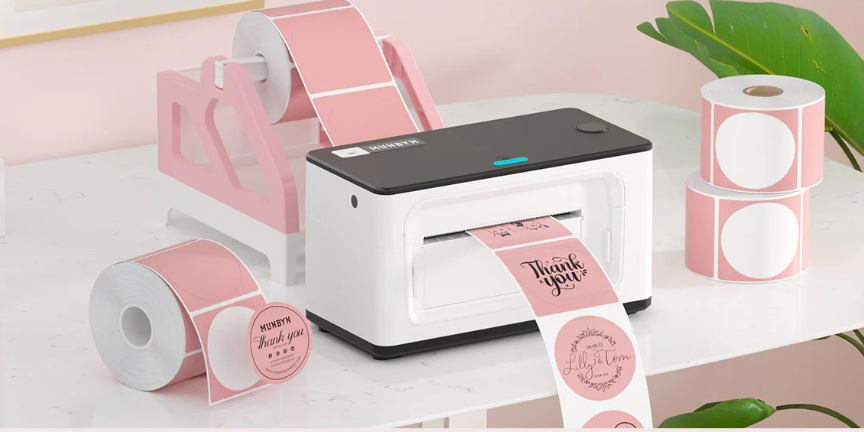
The MUNBYN RW941BP thermal printer offers 300 DPI print quality and ensures razor-sharp results.
Additionally, it impresses with a modern design in colors like pink or green. Ideal for businesses that want to combine functionality and brand aesthetics.
How to Optimize Your Thermal Printer for Shipping Labels
Once you've selected your hardware, the focus shifts to optimizing your daily operations and maintenance. A high-quality printer is only as good as the labels you use and the care you give the device. To maintain peak performance in your workflow, follow these proven industry practices:
☆ Use high-quality thermal labels: Cheap labels can have uneven coatings that wear out the print head faster. Why not consider using MUNBYN shipping labels?
☆ Regular cleaning: Gently clean the print head with an alcohol swab every time you change rolls to avoid residue.
☆ Correct sizing: Use automatic label detection to ensure your margins are perfect every time, reducing waste.
☆ Update drivers: Always keep your firmware and drivers up to date to ensure compatibility with new shipping software updates.
Which Model Is Right for You?
The last step is simple: check if the printer fits your current workflow and your next phase of growth. A good purchase should save time today and still be useful as order volumes increase.
- Does it support your main shipping platform and device setup?
- Does it handle the label sizes you use most often?
- Do you need standard clarity or the sharper 300 DPI output?
- Do you want the lowest entry cost, a more durable model, or a more stylish printer?
For most sellers, the safest way is to choose a thermal printer and then adapt the model to the budget and growth plan. MUNBYN's current range makes this easy, as the collections offer clear options for different store sizes and styles. If you want a simple start, the RW403B is the practical choice. If you want stronger long-term value and two-color printing, the RW405B is outstanding. If clarity and aesthetics are most important, the RW941BP is the best premium choice.
Conclusion
Choosing the best printer for your e-commerce business is one of the most impactful decisions an entrepreneur can make for their daily workflow. By moving away from inefficient home printers and adopting a dedicated thermal shipping label printer, you're not just buying a machine; you're reclaiming valuable hours of your time and professionalizing your brand's first physical touchpoint with the customer.
The right hardware ensures that your logistics run as smoothly as your sales process, allowing you to focus on what truly matters – growing your business and connecting with your community. Whether you opt for the aesthetic brilliance of the RW941BP or the innovative two-color features of the RW405B: MUNBYN offers the reliable tools necessary to dominate the modern e-commerce market. Your shipping label printing should be the easiest part of your day – and with the right thermal technology, it finally will be.
Share:
Barcode Scanning in Logistics: How It Improves Tracking Accuracy
How to fix label printer alignment issues