


 Italy
Italy Bestseller
 All Printers
 All Labels
 Money Counters
 All Accessories
If you're in the market for a new label printer, you've likely come across MUNBYN. As a recognized brand, we offer a variety of label printing technologies and printer models to meet the diverse needs of businesses and individuals. But with so many options, it's easy to feel lost and confused. Don't worry! We've put together a buying guide to help you understand the features of MUNBYN label printers and make an informed decision for your next printer.
Why do you need a thermal label printer?
If you own a small business or work from home, a thermal label printer can play a crucial role. This versatile device allows you to easily create professional-looking labels for a variety of applications. Here are some scenarios where a thermal label printer can be very useful:
- Shipping and Mailing: Whether you're sending products to customers or mailing invoices, a thermal label printer can significantly simplify this process. You can print shipping labels directly from your computer, and many printers are compatible with popular shipping platforms like USPS, UPS, FedEx, Amazon, and eBay.
- Inventory Management: If you have a small warehouse or inventory space, a thermal label printer can help you keep track of your products. You can print labels for individual items, as well as shelf labels and bin labels to keep everything organized.
- Retail and E-commerce: If you run an online store or a retail business, a thermal label printer can help you create product labels and barcodes. This makes it easier for customers to find what they're looking for and streamlines the checkout process. You can also create personalized stickers to decorate your packages and leave a unique impression on your customers.
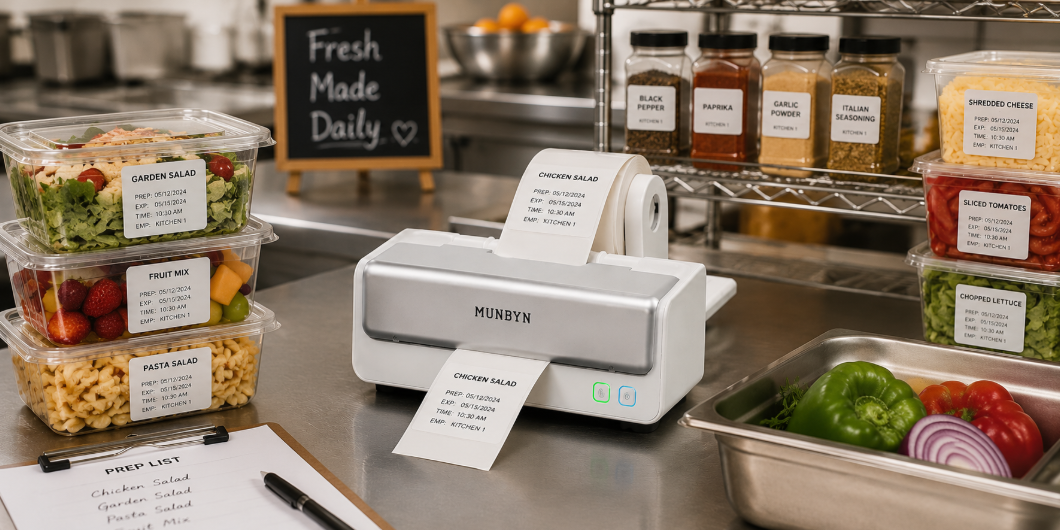
- Food and Beverages: If you operate a restaurant or a catering business, a thermal label printer can help you create labels for your food and beverages. This is especially useful for catering events where you need to label individual dishes with allergen information and other details.
- Home Organization: If you're a busy parent or simply someone who wants to keep their home organized, a thermal label printer can be a lifesaver. You can use it to label storage containers, organize pantries, and even make labels for your children's school supplies.
Factors to Consider When Buying a Printer
When considering purchasing a label printer, there are several factors you need to take into account.
- Print Speed: The speed of the printer can affect productivity. If you need to print large quantities of labels quickly, a faster printer might be necessary.
- Print Resolution: The resolution of a thermal label printer determines the quality of the print. Higher resolution printers produce sharper and more detailed prints. 203dpi and 300dpi are sufficient for most needs.
- Connectivity Options: Consider how the printer will connect to your computer or other devices. Some printers offer USB or Wi-Fi connectivity options.
- Cost: The initial cost of a thermal label printer can vary greatly depending on features and performance. Consider your budget and the features that are important for your needs.
- Label Size and Material Compatibility: Pay attention to the size and material of the labels you plan to use and ensure that the printer you choose can handle them. Some printers are only compatible with certain label sizes or materials, so it's important to do your research before purchasing.
- Brand Reputation: Choose a reputable brand known for producing reliable and high-quality printers.
- Customer Reviews: Read Munbyn customer reviews here.
- Customer Support: Look for a manufacturer that offers good customer service and support to ensure that any issues are resolved quickly and efficiently. With Munbyn's 24-month warranty, customers can feel secure.
- Ease of Use: The Munbyn printer is easy to set up with the included U-disk and can print quickly. Additionally, the Munbyn Label Converter offers additional features that allow for batch printing of multiple PDF files and enable a 4x6 label printer to also print 8x11 labels. These features can save you time and increase efficiency when you need to print a large number of labels.
Key Features of the Bluetooth Label Printer ITPP129
- Connection Type: This series supports both USB and Bluetooth connectivity options, allowing the printer to be easily connected to a variety of devices, including computers, smartphones, and tablets.
- Printing Technology: The ITPP129 series uses direct thermal printing technology, which does not require ink or toner cartridges. Instead, heat activates special paper, producing high-quality and durable labels.
- Label Type: This series is compatible with both roll labels and fanfold labels, giving you the flexibility to choose the label format that best suits your needs.
- Color Options: The ITPP129 series is available in black and pink, offering the option to add a fun, personal touch to label printing.
- Print Output: This series prints monochrome, meaning labels in a single color, usually black.
- Price: At a price of €129.99, the ITPP129 series is a relatively affordable option compared to other label printers on the market.
- Resolution: The print resolution of the series is 203 DPI (dots per inch), and it can print at a speed of up to 150 mm/s (6 inches/s), allowing for quick creation of high-quality labels.
- Compatibility: The series is compatible with a wide range of devices and operating systems, including iOS, Android, Windows, and Mac, which facilitates seamless integration into your existing technology landscape.
- Label Software: The ITPP129 series comes with the MUNBYN Print App, which allows you to design and print custom labels directly from your smartphone or tablet.
- Label Width: The series can print labels with a width of 1.57″ to 4.3″ (40mm to 110mm), giving you flexibility in the size and shape of your labels.
- Shipping Platforms: The series is compatible with all major shipping and shopping platforms, such as USPS, UPS, FedEx, Amazon, and eBay, making it a convenient solution for businesses that need shipping labels.

Reasons to choose ITPP129:
- The ITPP129 Bluetooth label printer simplifies life by reducing cable clutter and keeping your home office tidier. The wireless connection allows for easy connectivity without annoying cables.
- The MUNBYN Print App allows you to design labels directly on your phone or tablet. It offers the ability to create personalized labels that add a personal touch to your packages.
Key Features of the Shipping Label Printer ITPP941B
- Connection Types: USB and Bluetooth for flexible connectivity options.
- Printing Technology: Direct thermal printing, eliminating the need for ink or toner.
- Label Types: Roll labels/fanfold labels allow you to choose the label format that best suits your needs.
- Color Options: White and pink offer a palette of colors to match various personal styles or office decor.
- Print Output: Monochrome for high-quality black and white labels.
- Price: €219.99 for the 203 dpi version offers affordable options for different budgets.
- Resolution: The printer offers a resolution of 203 dpi with a print speed of up to 150 mm/s.
- Compatibility: Compatible with Windows, Mac, Chrome OS, and Linux, making it easy to use the printer with different operating systems.
- Label Width: It is possible to print labels with a width of 1.57 to 4.3 inches, allowing for flexible selection of label size according to your needs.
- Shipping Platforms: Supports all major shipping and shopping platforms such as USPS, UPS, FedEx, Amazon, and eBay, making it a versatile printer for anyone who frequently sends packages or needs labels for online orders.

Reasons to choose ITPP941B:
- High-Quality Print Effect: This shipping label printer allows for high-quality printing thanks to a resolution of 203 dpi.
- Attractive Design: The printer is available in several color variants, including attractive bright as well as classic and natural tones, so you can choose from a variety of colors to match your unique style.
- Cost-Effectiveness: It offers a budget-friendly price and high resolution.
Key Features of the USB Thermal Printer ITPP941
- Connection Type: The ITPP941 thermal label printer only offers a USB connection.
- Printing Technology: The printer uses direct thermal printing technology, eliminating the need for ink or toner.
- Label Type: The printer supports both roll and fanfold labels.
- Color Options: The ITPP941 model is available in pink, gray, and white.
- Print Output: The printer offers monochrome printing.
- Price: The price of the printer is €217.99 for the 300 dpi model.
- Resolution: The printer offers a high resolution of 300 dpi with a print speed of 150 mm/s.
- Compatibility: The printer is compatible with Windows, Mac, Chrome OS, and Linux.
- Label Print Width: The printer can print labels with a width of 1.57 to 4.3 inches.
- Shipping Platforms: The ITPP941 thermal printer can print labels from all major shipping and shopping platforms, including USPS, UPS, FedEx, Amazon, and eBay.

Reasons to choose ITPP941:
- High-Quality Printing and Reliable Performance: The high-resolution 300 dpi printing ensures clear and sharp labels. It works with any brand of thermal paper, ensuring compatibility with various label types and materials.
- Unique and Stylish Design: The available color options, including pink, add a touch of personality and style to your workspace.

Share:
The Best Printer for Small Businesses: A Guide to Thermal Technology
Personalize Your Christmas Gifts with Custom Labels