




 France
 Bestseller
 All Printers
 All Labels
 Money counting machine
 All Accessories
Thanks to modern logistics companies, shipping items worldwide has never been easier. Imagine being able to send a package from your living room with just a few clicks! Among the leading giants in the shipping industry is DHL, a name known globally for reliable and efficient services. Whether you run a small business or want to send a gift to a loved one, creating and printing a shipping label at home can save you a lot of time and effort. In this guide, we'll explain everything you need to know.
What is a DHL shipping label?
DHL is a renowned logistics company that stands alongside other industry leaders such as UPS, USPS, and FedEx. Known for its speed, reliability, and extensive global reach, DHL helps millions of customers efficiently send packages around the world.

But what exactly is a DHL shipping label? A DHL shipping label is an essential part of the shipping process. It contains all important information about your package, including the sender's and recipient's addresses, a barcode for tracking, and the service type. This label ensures that your package travels smoothly from point A to point B. It is used for both national and international shipments to ensure they arrive safely and on time. Without this label, your package would be like a traveler without an itinerary – lost and aimless!
Why print DHL shipping labels at home?
Printing a DHL shipping label at home offers several advantages. Firstly, you enjoy convenience, as you no longer have to wait in long queues at the DHL office and can do everything from home. Secondly, 24/7 availability is guaranteed, allowing you to handle your shipping needs at any time. Thirdly, you benefit from cost savings, as you save fuel and time because no travel is required. Fourthly, it offers speed, as there's no waiting at the office and instant printing is possible. Finally, flexibility is high, as you can print anytime.
The following table illustrates these benefits:
|
Feature |
Print at home |
Print at DHL office |
|
Convenience |
Anytime, anywhere |
Limited to office hours |
|
Cost |
Save fuel and time |
Travel and waiting costs |
|
Speed |
Instant |
Possible waiting time |
|
Flexibility |
High |
Low |
With standard printers and an internet connection, you can create your shipping labels quickly and effortlessly.
Essential items for printing DHL shipping labels at home?
To start printing your own DHL shipping labels at home, you'll need a few essential supplies. These tools ensure that your shipping process is smooth, efficient, and professional. Let's look at the main supplies you'll need:
Thermal printer
A thermal printer is highly recommended for printing shipping labels. Unlike traditional inkjet printers, thermal printers use heat to create images on special thermal paper, eliminating the need for ink. This makes them faster, more reliable, and more cost-effective in the long run. Thermal printers produce crisp, clear labels that are easy to scan, ensuring a hassle-free shipping experience.

Printing paper
The type of shipping label paper you use can significantly impact the quality of your shipping labels. For thermal printers, you'll need compatible thermal label paper. This special paper ensures that the printed information is durable and resistant to smudging or fading. High-quality printing paper contributes to the overall professionalism of your shipments.

Postal scale
Accurate weight measurement is crucial for determining the correct postage for your packages. A postal scale helps you accurately and easily weigh your items at home, avoiding underpaying or overpaying for shipping fees. It ensures that your packages comply with shipping regulations and avoids delays or additional charges.
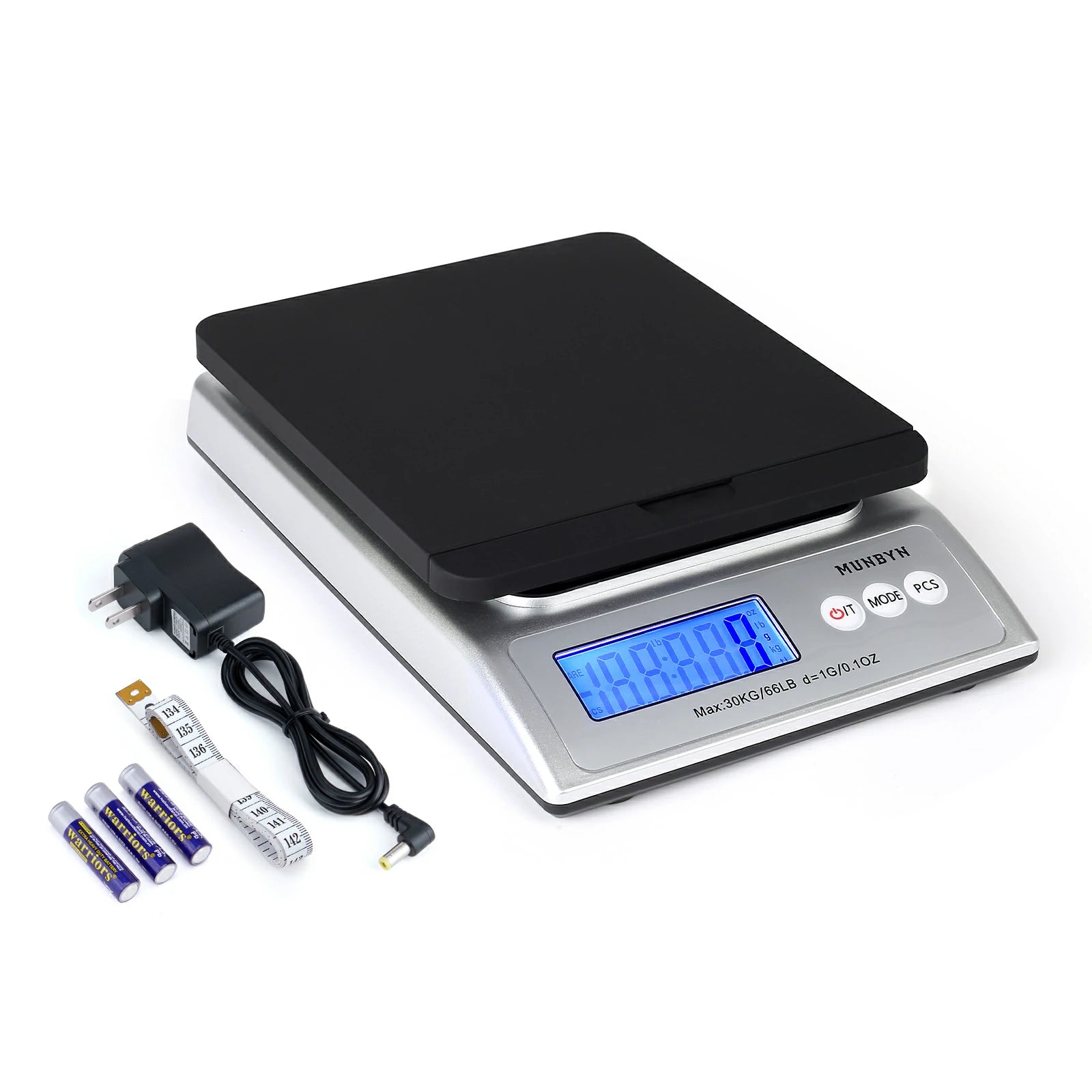
All these items are essential for a seamless home shipping experience, and that's where MUNBYN comes in. MUNBYN offers high-quality inkless thermal printers, premium thermal printing paper, and precise postal scales, making it your one-stop shop for all your shipping needs. By investing in MUNBYN products, you can ensure your shipping process is efficient, professional, and cost-effective.
How to print DHL shipping labels at home?
The process of printing DHL shipping labels at home is simple and user-friendly. With the necessary supplies and an internet connection, you can significantly simplify your shipping process. The following guide will walk you through the easy steps required to print DHL shipping labels conveniently from home.
For individuals:
Step 1: Log in to your DHL account

Step 2: Enter shipping details
Fill in the required details about your shipment, including recipient information, package dimensions, and weight.
Step 3: Weigh package
Use a postal scale to get an accurate weight of your package. This ensures you pay the correct postage.
Step 4: Pay postage
After entering all necessary information, proceed to payment.
Step 5: Print label
Once payment is complete, you can print the shipping label directly from the DHL platform using your thermal printer.
For small business owners:
Step 1: Log in to your DHL account
Access your DHL account via the official website or app. Then click on "Send" > Select "Get a quote" in the left column > Select "I am shipping as a business".

Step 2: Batch process orders
For frequent or large shipments, use the batch processing tools provided by DHL. This allows you to enter multiple shipping details at once.
Step 3: Weigh packages
Ensure each package is accurately weighed with a postal scale to avoid discrepancies.
Step 4: Payment for multiple shipments
Proceed with payment for all your shipments in one go.
Step 5: Print all labels together
Once payment is complete, you can print all necessary shipping labels simultaneously. This saves time and simplifies your shipping process.
By following these steps, you can efficiently manage both occasional and large shipping requirements from home.
Summary
Creating DHL shipping labels from home is a convenient and efficient solution for both occasional shippers and small business owners. With simple steps and the right equipment, you can simplify your shipping process. MUNBYN offers all the necessary tools – such as thermal printers, printing paper, and postal scales – to make this task as easy and efficient as possible. Give it a try today!
Share:
Ultimate Guide: How to Label Your Products for Amazon FBA
Geldzählmaschine: UV-, MG-, IR- und CIS-Falschgelderkennung einfach erklärt