


 France
 Bestseller
 All Printers
 All Labels
 Money Counters
 All Accessories
Do you want to adorn your skin with a tattoo but without a long-term commitment? Or perhaps you want to try out how a tattoo would look on your skin before deciding on a permanent one? You don't need a special tattoo printer for this. With a conventional thermal printer, you can create your own temporary tattoos in just about 10 minutes. If you're also wondering if there's a versatile printer suitable for both documents and business purposes as well as for printing tattoos – a thermal printer is the ideal solution. In this guide, we'll show you the simplest steps to make your own temporary tattoos at home with a thermal printer.
What types of tattoo stencil paper are common?
When it comes to transferring your tattoo design onto your skin, choosing the right stencil paper is crucial. Let's look at two popular options: hectographic paper and thermal paper.
Hectographic Paper
Hectographic paper is a three-ply paper that serves as a reliable medium for manual transfer of designs. The top layer is tracing paper, on which the tattoo artist draws the design by hand. The middle layer acts as a protective layer and should be carefully removed before starting the stenciling process. The bottom layer is the pigment sheet, also known as carbon paper.
However, it's important to note that hectographic paper is not compatible with thermal printers. This type of paper requires the artist's skill to create the design directly on the paper.

Thermal Stencil Paper
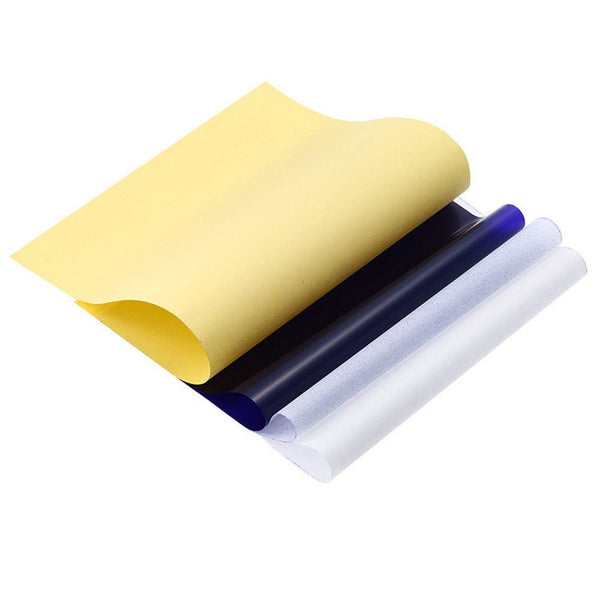
For those who prefer digitally created designs or desire a simpler process, thermal paper is the better choice. This type of paper consists of four layers. The top layer is a white sheet, often referred to as tracing paper. This layer is where the digital design is printed using a thermal printer.
Directly beneath the tracing paper is the onion skin – a protective film that needs to be peeled off before starting the stenciling process. The third layer is the carbon paper. And finally, there's a yellow protective layer.
Thermal paper is highly compatible with thermal printers, making it an excellent choice for anyone looking to bring their digitally crafted designs to life. It's efficient, produces sharp results, and offers a seamless transition from screen to skin.
What do you need to print tattoo stencils?
-Thermal stencil paper
-Tattoo gloves
-Computer or phone/tablet
-Scissors
-Towel
-Tattoo stencil spray
How to make temporary tattoos with a thermal printer?
Step 1: Remove the onion skin layer located between the tracing paper and the carbon paper, and also peel off the yellow paper.
Step 2: Open the printer lid.
Step 3: Insert the carbon paper into the printer with the coated side facing down, so that the tracing paper faces up with the printable side.
Step 4: Connect your computer or tablet to the thermal printer and start the printing process by selecting the "Print" option.
Step 5: After the design has been printed, carefully separate the tracing paper from the carbon paper.
Step 6: Cut out the printed design to make it easier to apply to the skin.
How are the tattoos applied?
Step 1: First, wash the skin area where you want to apply the tattoo. Use soap to ensure the skin is clean and free of oils.
Step 2: Take some tattoo stencil spray or stencil glue and lightly spray the area of your skin with it.
Step 3: Place the tracing paper with the tattoo design on the prepared skin area and press it firmly. Gently smooth a clean towel over the paper to ensure the stencil adheres well and dries.
Step 4: Slowly peel off the tracing paper, and voilà! You have successfully applied your own tattoo!
Can a standard printer be used for tattoo stencils?
While you can use a standard printer, it's important to use the appropriate paper for making tattoo stencils. Regular paper is not suitable for creating tattoo stencils like thermal paper or hectographic paper. Hectographic paper can be used in both inkjet and laser printers, but the use of thermal paper is not recommended with these printers.
So why choose a thermal printer?
The crucial advantage lies in the type of ink. Thermal printers are more reliable because they don't require ink, which can lead to smudging or paper jams with inkjet printers. With a thermal printer, you can easily print tattoo templates without consuming ink and without wasting paper.
Summary
Ready to explore thermal printing? Then check out the Munbyn A4 portable thermal printer. It's a versatile device that not only allows you to create amazing tattoos but also handles various printing tasks with ease. Get creative and make your printing tasks a breeze with Munbyn!
Share:
How to print shipping labels on Etsy? (A step-by-step guide)
Ultimate Guide: How to Label Your Products for Amazon FBA